Key Takeaways
- A tap to review card is the fastest way to gather feedback from happy buyers before they leave your shop.
- You only need a simple tap or a quick scan to send someone right to your Google review page.
- Wooflo provides smart tools that help you build a brilliant online reputation without any hard work.
- Using a custom branded NFC card helps you look deeply professional and builds huge buyer trust.
- Placing a review stand for counter areas reminds people to leave a star rating while they wait.
- You can enjoy a one time payment review card with zero monthly fees to collect unlimited taps.
- Fast customer feedback helps your local business grow and brings more people to your front door.
Do you want more people to find your shop? Google Review Cards are changing how shops, cafes, and trades work today. At Wooflo, we know that growing a business can feel hard. We make it easy, fun, and deeply rewarding. As your trusted growth partner, Wooflo helps you connect your physical shop to your digital world.
If you want to know how to collect reviews on the spot and build strong customer loyalty, you are in the right place. We will show you exactly how a simple card can transform your business.
What Are Google Review Cards and How Do They Work in the UK?
Many people ask what these clever cards actually do. Let us break it down into very simple parts so anyone can understand.
What a Google Review Card actually is
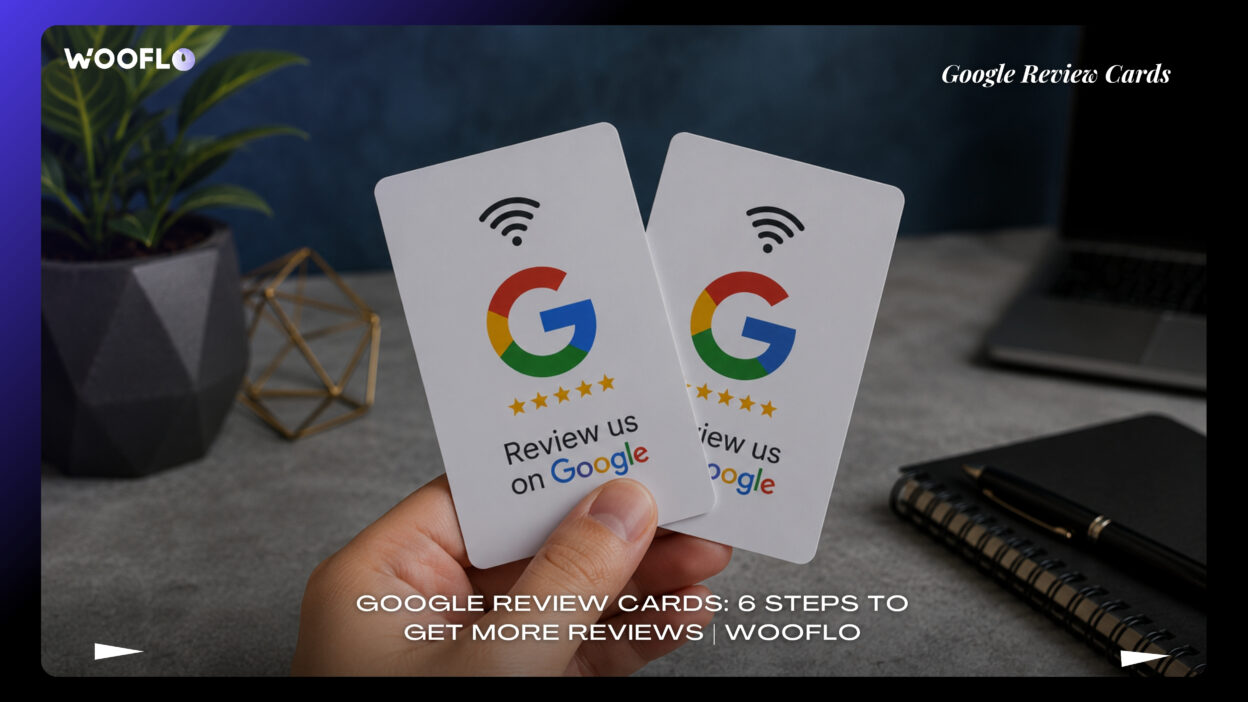
A Google review tap card is a physical piece of plastic or metal. It looks just like a bank card. However, this business review card UK style has a special job. It asks people to share their happy thoughts about your work. You do not need to send awkward texts or emails anymore. You just hand them the review collection card.
How NFC and QR code review cards send customers to your Google review page
Inside the premium NFC chip review card, there is a tiny smart chip. This is called NFC. It stands for near-field communication. When someone holds their phone near the NFC business review card, a link pops up on their screen. If they have an older phone, they can use the QR code review card feature. They just point their camera at the dynamic QR code on the back. It works perfectly as an iPhone Android review card. It is a true no app review card. They just tap and write.
Why Google Review Cards are growing across the British market
Shop owners across Britain love things that are simple. Google review cards for British businesses are booming because they save time. People want to support local shops. When you use a smart review card, you make it easy for them. We see many UK businesses using a review marketing tool UK style to look professional.
Which UK businesses benefit most: salons, restaurants, plumbers, dentists and shops
Every single face-to-face business can use this. A Google review card for restaurants helps waiters get tips and praise. A Google review card for salons helps hairdressers show off their amazing work. A Google review card for dentists helps calm nervous patients when they read happy stories. A Google review card for tradesmen, like a Google review card for plumbers or a Google review card for electricians, is brilliant for home visits. Even a Google review card for beauty salons, a Google review card for retail shops, or a Google review card for hospitality businesses works wonders. In short, a Google review card for local businesses is perfect for everyone.
Why Google Review Cards Matter for Local Visibility and Trust
We want to help you get seen. Let us look at why a trust building review card is so important for your shop.
How fresh Google reviews help Google Business Profile visibility
Your Google Business Profile is like your digital shop window. When you use a Google Business Profile review card, you get fresh words from real people. Google loves fresh words. This helps your shop show up when people look for things nearby. A good online reputation card acts as a shining light for your shop.
Why review velocity, star ratings and recency influence buyer trust
People trust other people. If someone sees a five star rating from yesterday, they feel safe. If the last review was from three years ago, they might walk away. A review booster card helps you get new reviews every single week. This builds your online reputation fast. When you use our Reputation Management tools at Wooflo, you keep that trust growing.
How Google Review Cards support Google Maps discovery for local businesses
A Google Maps review card helps people find you on the map. When they search for a coffee or a haircut, your shop pops up with bright stars. Many owners ask about Google reviews for local SEO or want to know how to improve Google rankings with reviews. While we keep things simple, just know that a local SEO review card helps you get discovered on the map very quickly.
The real-world benefit: fewer missed reviews after a good customer experience
Have you ever done a great job, and the buyer promised to write a review, but they forgot? A customer feedback card UK style stops this from happening. Because it is a contactless review card, they do it right there in front of you. You never miss out on a happy story again.
How to Set Up Google Review Cards in 6 Simple Steps
Setting up your new tools is incredibly easy. You do not need to be good with computers. Follow these six steps.
Step 1: Claim and update your Google Business Profile
First, make sure you own your Google listing. Check that your opening hours are correct. Make sure your address is right. Our Local Business Checklist can help you get this sorted in minutes.
Step 2: Get your direct Google review link
Go to your profile and find the button that says “Get more reviews”. Click it. You will see a short web link. Copy this link. This is the magic link that goes into your pre-programmed Google review card.
Step 3: Choose NFC, QR code, or tap-and-scan review cards
You can pick the style that fits you. A tap and scan review card gives you both options. An NFC and QR review card is the safest bet because it works for every single person who walks through your door.
Step 4: Add branding, logo and clear “Tap to Review” instructions
You want to look your best. Choose custom Google review cards so you can do a logo upload. A review card with logo looks much better than a blank one. These personalised review cards or branded review cards UK style show you care about your image.
Step 5: Test on iPhone, Android and older devices with QR backup
When your cards arrive, test them. Tap an Apple device and tap an Android phone. Make sure the smartphone compatible review card opens the right page instantly. Check the scan to review card feature with your camera too.
Step 6: Place cards at your till, reception, table, van, or checkout area
Now, put your tools to work. Hand them out. Stick them to the wall. Make them part of your daily routine.
Top 10 Places to Use Google Review Cards for Better Results
Where should you put these clever tools? Here is a helpful list.
1. Reception desks and front counters
A reception desk review card is perfect for greeting areas. A review stand for reception looks very smart.
2. Restaurant tables and payment areas
Place a Google review stand on the tables. Diners can tap while they wait for the bill.
3. Salon stations and mirrors
Put a Google review plaque UK style on the mirror. Clients can tap while their hair is drying.
4. Trade vans after the job is complete
Keep a weatherproof review card in your van. Hand it to the homeowner when the job is done.
5. Dental and clinic waiting areas
A review card for clinics helps waiting patients read happy thoughts and leave their own.
6. Retail checkouts
A till point review card or a point of sale review card is great when handing over the shopping bag.
7. Event stands and pop-up stalls
Use a review card for face to face businesses when you meet people at a busy local market.
8. Delivery packaging inserts
Slip a review collection card into the box before you post it.
9. Hotel reception and guest check-out
Use a review card for cafes and restaurants or hotels when guests hand back their room keys.
10. Staff-specific cards for performance tracking
Use employee review cards so you know which team member makes the most people happy.
Google Review Cards UK: NFC vs QR Code vs Review Stand
Let us look at the different types you can get from places like Tap Review Cards.
If you want speed, the NFC Google review card is best. It uses a tiny chip for an instant one tap Google review. If you want safety, the QR Google review card works on older phones that do not have chips inside. If you want something that sits nicely on a desk, a Google review NFC stand or a review stand for counter areas is perfect. They do not get lost in a drawer.
Top 7 Valuable Hacks to Get More Reviews With Google Review Cards
Want to be a true expert? Use these simple hacks.
1. Ask at the exact moment the customer is happiest
When they smile and say thank you, hand them the tap to leave feedback card.
2. Train staff to use a short, natural review prompt
Teach your team to say, “If you are happy today, a quick tap helps our small shop grow.”
3. Put a QR code on every NFC card as a fallback
Always use an NFC and QR review card so nobody gets left out.
4. Use trackable cards or dashboards to see which staff perform best
Use trackable review cards with a review management dashboard. A staff leaderboard review tool makes gathering feedback a fun game for your workers.
5. Add a private feedback loop before negative issues become public
Use smart feedback loop reviews. If someone is upset, a private feedback before public review system catches them first. They talk to you, not the whole internet.
6. Respond to every review to strengthen trust and conversion
Always say thank you online. Our AI Reputation Tool can even act as an AI review responder to help you write nice replies quickly.
7. Refresh card placement based on customer flow and dead zones
Move your review stand around. If people ignore it near the door, move it next to the till.
Top 5 Things to Check Before Buying Google Review Cards in Britain
Before you order, look for these signs of quality from suppliers like Reviews Card.
1. UK delivery speed and dispatch times
Look for review card printing UK services. You want fast UK delivery review cards. Check if they offer next day delivery review cards or next-day UK dispatch review cards.
2. Works on iPhone and Android with universal phone compatibility
Make sure it works for everyone. The smartphone compatible review card must never fail.
3. No monthly fees or hidden software costs
You should look for a no monthly fee review card. A simple one time payment review card is best. You want unlimited taps review card features and unlimited scans review card features without extra bills.
4. Branding quality, weatherproof finish and print durability
Choose a premium NFC chip review card. Ensure they offer custom branding and a strong finish that does not peel or scratch.
5. Dashboard features, staff leaderboards and review tracking
Find a verified customer review tool that includes review performance tracking. This helps you see your progress clearly.
Top 10 Questions Buyers Ask Before Choosing Google Review Cards
We hear lots of wonderful questions from shop owners. Here are the answers.
1. Do Google Review Cards really work in the UK?
Yes, totally. A local business review solution UK style brings in massive results daily.
2. Are Google Review Cards allowed by Google?
Yes, Google loves when you ask happy buyers for honest feedback.
3. Can I use them for my Google Business Profile?
Absolutely. A leave a Google review card links right to your profile.
4. What is better: NFC or QR code?
A tap and scan review card that does both is always the smart choice.
5. Do they help local visibility?
Yes. A review card for Google search visibility or a review card for Google Maps ranking (as some call it) helps you get seen.
6. Do they work on all phones?
Yes. Every modern smartphone can use a smart review card.
7. How much do Google Review Cards cost in the UK?
They are very friendly for your pocket. Many offer zero monthly fees.
8. Should I choose a supplier or a good agency?
A supplier gives you the card. An agency like Wooflo gives you a full customer journey plan.
9. Can I track results across staff or locations?
Yes, employee review cards let you track everything easily.
10. What if a customer had a bad experience?
A review dashboard with a Smart Feedback Loop helps you solve problems quietly.
Google Review Cards Pricing Models in the UK: What Businesses Should Expect
When looking at NFC review products UK options, you will find different packages. We do not discuss exact numbers, but here is what you can expect.
Budget printed QR review cards
These are very plain and simple. They do the job but lack a premium feel.
Mid-range NFC and QR combo cards
These are brilliant. You pay once and get a beautiful Google rating card that works forever.
Premium solutions with dashboard tracking and AI replies
This is a full review generation tool UK system. You get trackable tools, custom printing, and smart software included.
Bulk order discounts, bundles and per-card costs
If you have a big team, look for review card bundles UK style. You can get bulk review card discounts to save pennies.
How to Choose the Right Google Review Card Supplier or Agency
You have choices like Local Insights, TapiLink, or OneTap Review.
When a simple card supplier is enough
If you just want one Google review request card for your pocket, a basic shop is fine.
When you need a review growth agency or reputation partner
If you want to grow fast, you need a partner like Wooflo. We help you gather verified reviews and build true buyer trust.
Signs of a good UK provider: support, setup, proofing and guidance
A good team helps you set up your Google review tap card. They check your business listing and ensure the link works.
Questions to ask before ordering custom review cards
Ask them: Do you offer a customer loyalty review card? Do you provide custom branding? Do you have next-day delivery?
Common Mistakes That Stop Google Review Cards From Working
Even with the best tools, things can go wrong if you are not careful.
Poor card placement
If you hide your Google review stand behind a plant, nobody will see it. Keep it in plain sight.
No staff training
If your team does not know how to hand over the in-store review collection card, it will sit in a drawer.
Sending customers to the wrong page
Always double check your link before you order your review page cards.
No QR backup for older devices
If you only buy an NFC business review card, older phones will struggle. Always have a printed code too.
Failing to respond to new Google reviews
If you ignore the nice things people write, they stop writing. Always say thank you.
How to Use Google Review Cards Without Annoying Customers
You never want to be pushy. Here is how to keep it friendly.
Ask politely, never force
Just say, “We would love your thoughts today.” Pass them the Google Review Cards UK style gently.
Keep the request short and natural
Do not give a long speech. Just point to your review stand for reception and smile.
Focus on convenience, not pressure
Tell them, “It only takes ten seconds.” The magic of a no app review card is the speed.
Use them after a completed service or positive interaction
Wait until the haircut is done or the meal is finished. A review card for shops and salons works best when the buyer is totally happy.
Best Google Review Cards for UK Businesses: What to Compare
When shopping around, put different cards side by side.
Compare materials, tap speed and QR quality
Look for a Google review key ring or a thick plastic card. It should tap instantly.
Compare branding and customisation options
A Google review signage UK board must match your shop colours. It must look professional.
Compare software extras like dashboards and AI review response
A good tool has a review dashboard to show you charts and stars.
Compare support, setup help and dispatch times
Ensure the company helps you if you get stuck, and look for fast UK businesses shipping.
Final Take: Are Google Review Cards Worth It for British Businesses?
Getting noticed today is not about shouting the loudest. It is about letting your happy buyers do the talking for you. A simple Google review card for small business owners makes this easier than ever before. Whether you run a busy cafe, a quiet salon, or a fleet of plumbing vans, these clever cards turn smiles into stars.
At Wooflo, we believe you deserve to be the heartbeat of your local economy. We guarantee results. We bring together smart digital tools, clever software, and brilliant physical products to make your life simple. Grab your cards, train your team, and watch your business blossom. When you build trust with genuine customer feedback, you build a business that lasts a lifetime. Let’s grow together.
Contact Information:
- Email: info@wooflo.pro
- Website: https://wooflo.com/
- Google Maps: https://maps.app.goo.gl/pydw8rU9gncWBwCS6
- Google Link: https://share.google/tqL92yxlIrgPVjGdh
- Contact Number: +33 7 45 96 94 59