Key Takeaways
- Google Review Cards make it quick for customers to share honest feedback.
- A customer can tap an NFC Google Review Card or scan a QR code.
- Every UK business location should use its own Google review link.
- Clear wording, simple design and good timing matter most.
- Never offer a reward for a positive review.
- Wooflo connects physical review tools with practical business growth support.
- Genuine feedback helps people feel safer choosing your business.
A great visit should not end when a customer pays the bill, leaves the salon, or shuts the front door after a repair. Google Review Cards give people a simple next step: tap, scan, and share an honest experience.
For local businesses across the United Kingdom, trust is hard won. A customer may need a new dentist, a café for lunch, a reliable plumber, or an estate agent. Before they call, book, or visit, many will look at Google Reviews, Google Maps and Google Search. A strong set of real reviews can help them feel more confident.
Wooflo helps businesses bring their customer experience together. That may include digital marketing, smart physical products, AI-powered tools, review support, digital signage, customer journeys and business software. The goal is simple: make it easier for great businesses to be found, trusted and remembered.
What Are Google Review Cards?
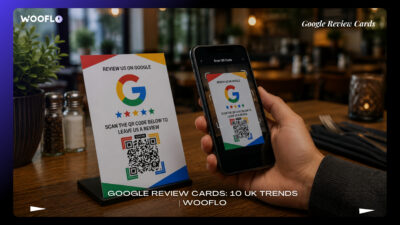
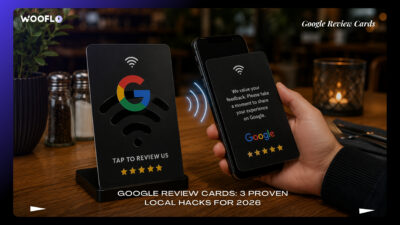
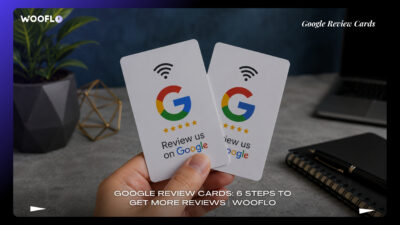
Google Review Cards are physical cards, plaques, table signs or counter displays that help customers reach a Google review form. A Google review card can use a Google Review QR code, Near Field Communication (NFC), or both.
A customer points their phone camera at a QR Code. Or they tap an NFC-enabled phone against the card. The card then opens the business’s Google Business Profile review page. This turns a small moment of happiness into a simple customer action.
You may also hear these products called:
- Google review NFC cards
- Google review QR code card
- Google review tap card
- tap to review card
- Google Business Profile review card
- Google Maps review card
- Google rating card
- Google review request card
- QR code review cards
- NFC review cards UK
- contactless review card
- tap and scan review card
- customer feedback card
- point of sale review card
- checkout review card
- till point review card
Google allows business owners to create and share a review-request link or QR code through their Business Profile. You can learn the official process in Google’s guide to creating a review link or QR code.
Why Reviews Matter in Britain
People like proof. A neighbour’s kind words can feel more believable than a big advert. That is why Google Business reviews and verified Google reviews can make a real difference to a local business.
A customer looking for a restaurant in London may compare Google Business Profile reviews before booking a table. Someone in Manchester may check Google Maps reviews before choosing a garage. A family in Birmingham may read feedback before calling a plumber, electrician or dentist.
Reviews can support:
- Trust before a first visit
- Better customer conversations
- A stronger Google Business Profile
- Helpful feedback for your team
- A healthier online reputation
- More confidence in your service
A Google Review Card is not magic. It cannot fix poor service. But it can make it easier for happy customers to speak when their experience is fresh.
For example, a café can place a Google review table stand near the till. A salon can use a Google review counter card at reception. A tradesperson can include a Google review QR card UK on a job-completion sheet. These small touchpoints can help customers act without searching for your business later.
8 UK Tips for More Trust
1. Use the Right Google Review Link
Start with the correct Google review link. Do not send customers to a general website, the wrong branch, or a page that does not open the review box.
Open your Google Business Profile. Select “Read Reviews”, then “Get more reviews”. From there, you can copy the link or use the official QR code. This is the safest starting point for a review QR code generator process because it connects to the right business profile. support.google
For companies with several branches, create a separate Google Place ID review link for each location. A customer visiting your Leeds branch should not accidentally leave feedback for your Liverpool branch.
2. Give Customers Two Easy Choices
The best Google review cards UK often use two routes: NFC and QR.
An NFC review card lets a customer tap a phone against the card. Most newer iPhone and Android devices can use this simple action. A QR code Google review card gives customers a second choice. They can scan it with their camera.
A tap-and-scan review card is useful because every customer uses a phone differently. Some people prefer to tap. Others prefer to scan. Giving both choices removes friction.
| Review Tool | How It Works | Good For |
| NFC Google Review Card | Customer taps their phone | Reception desks and payment points |
| QR code review card | Customer scans with camera | Tables, receipts and window displays |
| Google review stand | Card sits in clear view | Salons, cafés, clinics and shops |
| Google review plaque | Fixed branded display | Restaurants, hotels and offices |
| Google review sticker QR code | Small scan point | Packaging, invoices and doors |
3. Ask at the Right Time
Timing matters. Ask after the customer has received the service. Not before.
A restaurant can ask after a good meal. A barber can ask after the final mirror check. A hotel can ask at checkout. A plumber can ask after the work is complete and the customer is happy with the result.
Keep the request warm and simple:
“Thanks for visiting. If you have a moment, please tap or scan to leave an honest Google review.”
This approach works for a restaurant Google review card, café Google review card, pub Google review card, salon Google review card, barber Google review card, beauty clinic Google review card, dentist Google review card, estate agent Google review card, plumber Google review card, electrician Google review card, hotel Google review card, gym Google review card, car dealership Google review card, garage Google review card and retail shop review card.
4. Ask for Honest Feedback
Trust starts with honesty. Never ask only for five-star reviews. Never write a review for a customer. Never offer a free item, discount or reward in return for a glowing review.
Google says incentives for reviews, including free or discounted goods or services, are prohibited. It also advises businesses to ask customers to share their experience through a link or QR code. support.google
A fair request is better:
“We would value your honest feedback.”
This works because it respects the customer. It also protects your reputation. Real reviews may not all be perfect, but they feel more believable.
The UK’s Competition and Markets Authority (CMA) has taken action around fake and misleading reviews. Businesses should always use real customer feedback and clear review practices. gov
5. Keep Your Card Clear and Branded
A card should be easy to understand in three seconds.
Use your logo. Use your brand colours. Add a short message. Keep the QR code large. Do not crowd the design with too much text.
Good choices include:
- custom Google review cards
- personalised Google review cards
- branded Google review cards
- printed Google review cards
- Google review cards with logo
- custom NFC review cards
- white-label Google review cards
- Google review card design
- Google review card template
- Google review display card
- Google review desk card
- Google review tabletop sign
Wooflo can help businesses create a clean, useful customer journey. A card can match your shop sign, receipt, menu, appointment card or digital signage. For businesses that want physical materials that feel part of the brand, Wooflo also provides printing services.
6. Place Cards Where People Can See Them
A brilliant card hidden in a drawer will not help anyone.
Put your Google review NFC stand where customers naturally pause. This may be at the till, by the card machine, beside a reception bell, on a café table, near a takeaway collection point, or on a service counter.
A Google review sign UK or Google review plaque can work well in busy spaces. A Google review tabletop sign suits hospitality review card use. A Google review sticker QR code can sit on invoices, packaging or a checkout screen.
For a UK business with staff, explain where the card sits and when to mention it. The request should never sound pushy. It should feel like a polite thank-you.
7. Reply Like a Human Being
Getting reviews is only one part of the job. Your reply matters too.
Thank people for kind feedback. Use their first name only if it is already public. Be calm when a review is negative. Do not argue. Do not reveal private facts about a person, booking, health matter or payment.
This is especially important for clinics, dentists, beauty services, schools and care businesses. The UK GDPR expects organisations to handle personal data lawfully. The Information Commissioner’s Office guidance on lawful basis is useful when planning how customer data is collected and used. ico.org
A simple reply can go a long way:
“Thank you for taking the time to share your visit. We are pleased you enjoyed the service.”
For a complaint:
“We are sorry that your experience did not meet expectations. Please contact us directly so we can look into this properly.”
This is part of strong review response management and thoughtful online reputation management.
8. Make Review Cards Part of a Bigger System
A card works best when it fits into everyday business care.
Your team should know how to ask. Your profile should show correct opening hours, photos, services and contact details. Your staff should reply to reviews. Your customers should always reach the right place.
Wooflo supports this wider picture through digital services, AI-powered business tools and physical customer-engagement products. The company brings together Google Business Profile optimisation, local SEO reviews, reputation management UK support, customer experience technology and smart physical engagement.
A business can also use tools such as Google Analytics, UTM parameters and Bitly to understand whether a review request was opened. These tools should be used carefully and clearly. They should never make a customer feel watched.
If you want to check the health of your profile, Wooflo offers a GMB audit. It can help you spot missing details and improve the customer journey around your Google Business Profile.
How to Create Google Review Cards
Step 1: Check Your Google Business Profile
First, make sure your business profile is claimed and correct. Check the business name, phone number, address, opening hours and category.
For a Google Review Card to work well, your customer must land on the correct profile. This is important for one-location shops and even more important for businesses with many locations.
Step 2: Get the Review Link
Use your Google Business Profile to get the review-request link. You can also download the official Google review QR code.
A Google review link generator may be useful for a custom card, but always test the final destination. It should lead to the correct review form.
Step 3: Create the Card Design
Choose a Google review card printing UK format that suits your business.
A small PVC card can work for a mobile team. An acrylic stand can work at reception. A wood or metal plaque may fit a hotel, pub or salon. A simple paper card can go inside a parcel or thank-you note.
The main message can be short:
Loved your visit? Tap or scan to share your honest feedback on Google.
Step 4: Add NFC Technology
For an NFC card, use a suitable chip such as NTAG213, made by NXP Semiconductors. The card stores a web address. When the customer taps the card, it opens that address.
Apps such as NFC Tools can help write the review link to the card. Test it before you give it to customers. Try an iPhone and an Android phone.
Step 5: Test the QR Code
Test the QR code in normal shop lighting. Test it from a short distance. Test it with several phones. Make sure it takes customers to the review form and not only to your homepage.
You can also add the same request to a receipt, email, WhatsApp message or Facebook follow-up, as long as the request is fair and clear.
Step 6: Train Your Team
Give staff one short sentence to use. Keep it natural.
“If you have a moment, we would love an honest review.”
Do not turn the request into a script that feels forced. Good service must always come first.
Step 7: Check and Improve
Look at your reviews each week. Are people mentioning the same strength? Are they raising the same problem? Use this feedback to improve.
This is where a customer review request becomes more than a review collection solution. It becomes a useful way to listen.
Review Cards for Different Businesses
Hospitality and Food
Restaurants, cafés and pubs can use a Google review card by the till, on the table, beside the takeaway counter or near the exit. A digital menu can also include a gentle review request after an order is complete.
Wooflo provides solutions for hospitality businesses, including digital menus and physical engagement tools. A restaurant can connect great food, good service and easy feedback in one smooth journey.
Health, Beauty and Wellbeing
A beauty clinic Google review card, a salon Google review card or a dentist Google review card should feel calm and professional. Put it at reception after the appointment.
Do not ask for personal health details. Do not mention private treatment information when responding to a public review.
Trades and Home Services
A plumber, electrician, builder or cleaner often finishes work at the customer’s home. A small branded review card on the invoice can be useful. A Google review card for small business can also sit in a job folder or follow-up email.
For service teams, an honest review can show future customers that the business turns up, communicates well and completes work carefully.
Property and Retail
Estate agents can share a review request after a sale, move-in, viewing or successful tenancy. Retail shops can use a Google review cards for local businesses display at the checkout.
The goal is not pressure. It is convenience.
Choosing the Right Review Card Partner
A good supplier should understand the difference between a pretty card and a working customer tool.
Look for:
- Google review cards for business that link correctly
- A Google review card supplier UK that can support your brand
- NFC cards for Google reviews and QR fallback options
- Strong physical materials
- Clear setup support
- Good advice for multiple locations
- A simple way to replace or update a card
- Help with wider customer experience needs
You may see choices such as Google review card printer, buy Google review cards UK, NFC review cards UK, Google review cards London, Google review cards Manchester, Google review cards Birmingham, Google review cards Glasgow, Google review cards Leeds, Google review cards Liverpool and Google review cards Edinburgh.
Wooflo stands apart by looking beyond one product. It can combine review cards with digital marketing, business software, AI reputation tool support, self-ordering kiosks, NFC products and digital signage. It is a growth partner for local businesses that want their online and offline customer experience to work together.
Google Review Cards and Other Platforms
Google is important, but it is not the only place customers may speak about your business.
Some businesses also use Trustpilot, Tripadvisor, Yell, Facebook, Instagram, Apple Maps and Bing Places for Business. A business with online bookings may use WhatsApp for appointment follow-ups. Google Merchant Center and Google Ads may also form part of a wider online presence.
Still, keep each customer request simple. Do not send people through a confusing chain of pages. If the card says “Leave a Google review”, it should open Google.
A good review generation tool should help customers share genuine feedback. It should not create fake comments or hide unhappy customers.
Common Mistakes to Avoid
Sending Customers to the Wrong Branch
One card should match one location. This is vital for multi-site businesses.
Making the Card Hard to Scan
Small QR codes, poor contrast and damaged cards cause problems. Test everything.
Asking Only Happy Customers
Ask every genuine customer for an honest review. Do not use review gating.
Offering Rewards
Do not give money, gifts, discounts or free services for reviews. This can damage trust and may breach platform rules. support.google
Ignoring Negative Feedback
A negative review can hurt. But a calm, helpful response can show future customers that you care.
Treating a Card as the Whole Answer
Google Review Cards help people share their experience. The experience still needs to be good. Friendly staff, clear communication, quality work and fast support are what people remember.
Frequently Asked Questions
Do Google Review Cards work?
Yes. They make it easier for a customer to find and open the correct review page. The best results come from real service, a simple request and good placement.
Are NFC cards better than QR codes?
Both are useful. NFC feels quick for a tap. A QR code is a helpful backup. That is why a tap-and-scan review card is often a strong option.
Can I use one card for every location?
No. Each branch should have its own Google Business Profile review link.
Can I ask for a five-star review?
No. Ask for an honest review. Do not tell customers what rating or words to use.
Can review cards help local businesses?
Yes. Google Review Cards can make customer feedback easier for local businesses, from a one-person trade service to a busy restaurant group.
Build More Trust With Wooflo
Google Review Cards are simple. But their value can be powerful. A tap or scan gives a real customer a chance to tell their story. That story may help the next customer choose you with confidence.
Wooflo helps businesses make that moment count. From branded Google Review Cards and physical engagement products to AI-powered reputation tools, customer experience support and digital services, Wooflo helps local businesses build trust in ways that feel clear, useful and human.
Start with one simple question after every great customer moment: Would you like to share your honest experience?
Contact Information:
- Email: info@wooflo.pro
- Website: https://wooflo.com/
- Google Maps: https://maps.app.goo.gl/pydw8rU9gncWBwCS6
- Google Link: https://share.google/tqL92yxlIrgPVjGdh
- Contact Number: +33 7 45 96 94 59